
AI에게 꿈 해몽을 요청후 첫 메세지가 넘어온 시점부터 즉각적으로 클라이언트에게 전송하고 싶었다
이렇게 하면 AI응답 지연시간도 줄어들고 사용자도 로딩 시간없이 실시간으로 해몽 내용을 볼 수 있다
Nest에서 sse 통신
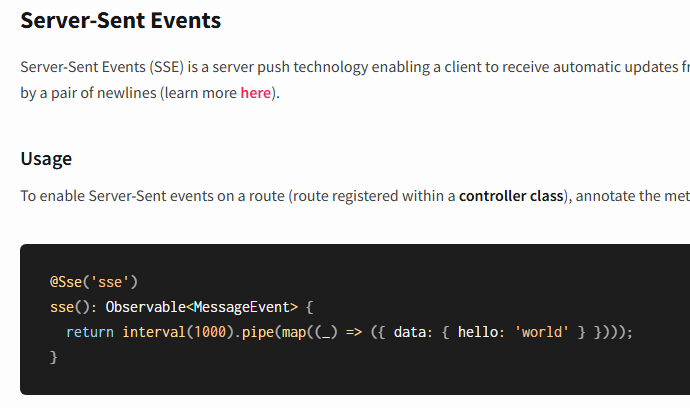
Nest 문서에는 @Sse 데코레이터를 통해서 간단하게 구현이 가능했다
그리고 해당 컨트롤러는 Observable 객체를 반환을 해야한다(Observavle은 Rxjs 라이브러리를 사용한다)
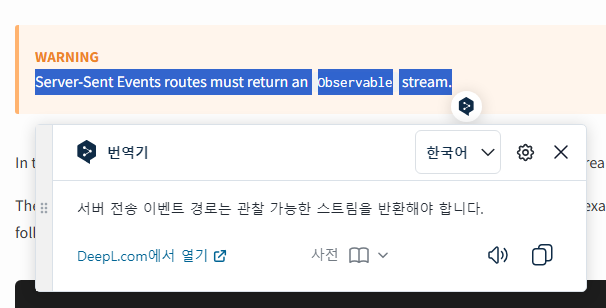
하지만 문제가 하나 있었는데
SSE는 GET요청만 지원하는 것이다
꿈에 대한 내용이 DB에 저장되어 있다면 경로 파라미터를 이용해 id값을 통해서 조회할 수 있지만
꿈에 대한 내용이 DB에 없는경우는 데이터를 어떻게 받아야 할지 막막했다
내가 생각한 방법은 2가지 정도가 있었는데
- 쿼리 파라미터로 꿈 내용 데이터를 받는다(내용이 길경우 압축해야한다)
- POST 메소드로 body에 데이터를 받고 응답을 SSE 통신으로 변환한다
나는 2번을 선택했다
이유로는 혹시나 꿈내용 이외의 데이터도 필요할 경우 body에 추가만 하면 되었고(확장)
압축을 진행할 필요도 없다
SSE 응답으로 변환하기
@Res 데코레이터를 통해서 Response 객체에 설정을 SSE로 변경한다
  @ApiOperation({ summary: '꿈 해몽' })
  @ApiBody({
    type: DecodedDiaryDto,
    description:
      '자신이 쓴 일기 해몽할 경우는 id값만 필요, 즉각적 해몽은 content만 필요',
  })
  @Post('/interpretaion')
  async decodeDream(
    @Body() decodedDiaryDto: DecodedDiaryDto,
    @GetUser() user: User,
    @Res() res: Response,
  ): Promise<void> {
    let stream: Stream<ChatCompletionChunk>;

    res.setHeader('Content-Type', 'text/event-stream'); //타입을 SSE로 설정
    res.setHeader('Cache-Control', 'no-cache'); //캐싱 하지마
    res.setHeader('Connection', 'keep-alive'); //TCP 연결을 유지하라 HTTP/1.1에서 기본적으로 설정되있음

    stream = await this.gptService.decodeDream('테스트하는 내용');
    const stack: string[] = [];
    for await (const chunk of stream) {
      const message = chunk.choices[0]?.delta?.content || '';
      console.log(message);
      stack.push(message);

      res.write(message);
    }

    res.end();
  }
SSE로 데이터를 보낼때 데이터 형식은 { data : string } 형식으로 보내주는게 맞는 방법이다
하지만 클라이언트와 조율을 해서 쌩 문자열만 보내주도록 했다
클라이언트에서 SSE 수신하기
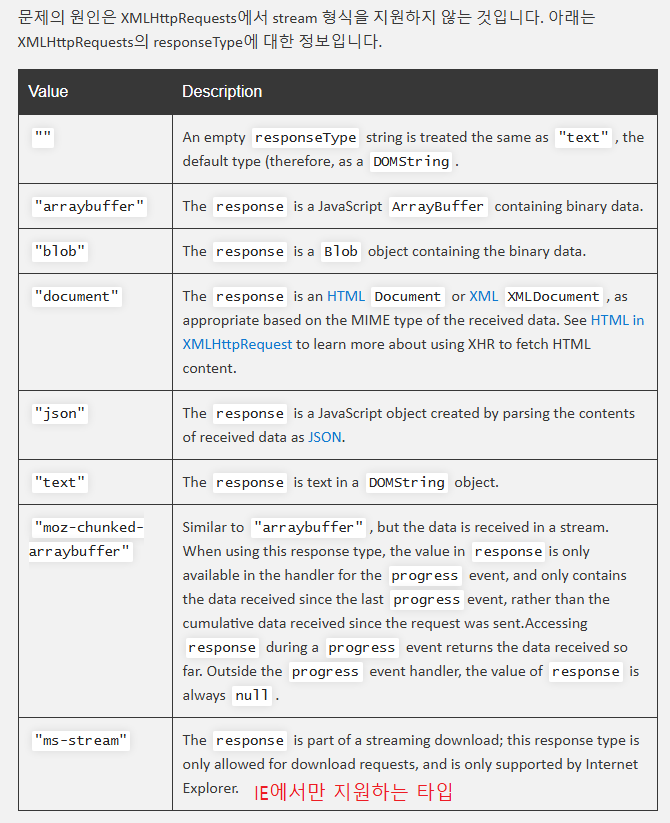
browser에서 axios는 stream 타입이 지원되지 않는다고 한다
node 에서의 axios Request는 HTTP를 사용하고
browser에서 axios Requset는 XMLHttpRequest를 사용하는데
XMLHttpRequest는 stream 타입을 지원하지 않기 때문이다
그래서 클라이언트에서 SSE를 수신하기 위해서는 fetch를 사용해야 한다
//node 환경에서는 stream 타입 가능
const response = await axios.get('', { responseType: 'stream'});
* 정상적인 GET요청의 SSE는 EventSource API를 사용해서 stream 구현 가능함
  const eventSource = new EventSource('http://localhost:3000/test-path');

  eventSource.onmessage = event => {
    //응답 받기
    const receivedData = JSON.parse(event.data);
    console.log('Received:', receivedData);
  };
XMLHttpRequest 가 허용하는 responseType들
fetch로 SSE 수신 코드
function App() {
  const [message, setMessage] = useState('');

  const fetchSSE = async () => {
    const response = await fetch('http://localhost:3000/diaries/interpretaion', {
      method: 'POST',
      headers: {
        authorization: 'Bearer token',
        'Content-Type': 'application/json', //body를 보내기 위해 json 타입으로 설정해야함
      },
      // body: {
      //   // 생략
      // },
    });

    // 데이터를 문자열로 받기위해 TextDecoderStream 사용
    const reader = response.body.pipeThrough(new TextDecoderStream()).getReader();

    // 데이터를 바이트 배열로 받으려면 getReader 사용
    // const reader = response.body.getReader();

    //SSE 연결이 종료될때까지 메세지 수신
    while (true) {
      const { value, done } = await reader.read();
      if (done) break;
      setMessage(prev => prev + value);
      console.log('!!', value);
    }
  };

  return (
    <>
      <button onClick={fetchSSE}>해몽하기</button>
      {/* AI응답 줄바꿈을 위해 whiteSpace: 'pre-line' CSS적용 */}
      <div style={{ whiteSpace: 'pre-line' }}>{message}</div>
    </>
  );
}
* fetch 코드를 참고한 글에서는 contetn-type을 text/event-stream 으로 설정했지만
* 해당 타입은 body를 포함하지 않으므로 body를 보내기 위해 application/json 으로 설정해야 한다
SSE 테스트 영상
참고 자료
https://yogae.github.io/etc/2019/06/11/node_client_stream.html
SSE (Server-Sent Events) Using A POST Request Without EventSource
This article will explain how to receive SSE from your frontend using a HTTP POST request, which is not supported by EventSource. Most…
medium.com
'Nestjs' 카테고리의 다른 글
| custom pipe 만들기 (0) | 2024.10.29 |
|---|
