/**
* Data Types
*
* 여섯개의 Primitive Type과
* 한개의 오브젝트 타입이있다.
*
* Primitive Type
* 1) Number (숫자)
* 2) String (문자열)
* 3) Boolean (불리언)
* 4) undefined (언디파인드)
* 5) null (널)
* 6) Symbol (심볼)
*
* 7) Object (객체)
* Function
* Array
* Object
자바스크립트는 여섯개의 Primitive Type과
한개의 오브젝트 타입이 있다고 한다
1~6 번이 자바스크립트의 데이터를 구성하는 가장 작은 단위이고
7번 오브젝트 타입이 있다
number(숫자열), string(문자열), boolean(불리언) 값은 다른 게시글이 있으니 패스하고
나머지 Primitive Type을 알아보자
/**
* undefined
*
* 사용자가 직접 값을 초기화하지 않았을떄
* 지정되는 값이다.(초기값)
*
* 직접 undefined로 값을 초기화 하는건 하지말도록 하자
*/
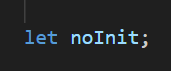
noInit 라는 변수를 만들고 값은 지정해주지 않았다
let noInit;
console.log(noInit);
console.log(typeof noInit);
이렇게 console.log로 noInit 라는 변수를 실행시키고
typeof로 noInit의 자료형을 물어보면
[Running] node "c:\Users\young hwan\Desktop\coding\Html,CSS,JavaScript\JavaScript\1_basics\5_data_types.js"
undefined
undefined
[Done] exited with code=0 in 0.085 seconds
실행시킨 noInit 변수는 undefined 값을 가지고
자료형도 undefined를 나타내는걸 볼 수 있다
/**
* null 타입
*
* undefined와 마찬가지로 값이 없다는 뜻이나
* JS에서는 개발자가 명시적으로 없는 값(빈 값)으로 초기화할때
* 사용된다
*/
undefined는 기본값 또는 초기값이고
null 은 개발자가 아무 값이 없는 빈 값으로 초기화 하고싶을때 쓰는 값이다
let init = null;
console.log(init);
console.log(typeof init);
이렇게 let 으로 init 이라는 변수애 null값을 넣어 빈 값으로 지정하고
콘솔에 실행시킴과 동시에 typeof 로 자료형도 물어보았다
[Running] node "c:\Users\young hwan\Desktop\coding\Html,CSS,JavaScript\JavaScript\1_basics\tempCodeRunnerFile.js"
null
object
[Done] exited with code=0 in 0.085 seconds
변수 init 은 null값이고
자료형은 null타입이 아니라 object로 나온다
이것은 개발자도 인정한 버그라고 한다
원래는 javascript에서 null은 자료형도 null 타입이 정상인데
실제로는 object로 인식이 되고있다고 한다
/**
* symbol 타입
*
* 유일무이한 값을 생성할때 사용한다.
* 다른 프리미티브 값들과 다르게 Symbol함수를
* 호출해서 사용한다.
*/
const test1 = '1';
const test2 = '1';
console.log(test1 === test2);
이렇게 test1과 test2라는 변수를 만들어 둘다 '1'이라는 값을 지정하고
=== 기호로 서로가 같은지 비교해보면
[Running] node "c:\Users\young hwan\Desktop\coding\Html,CSS,JavaScript\JavaScript\1_basics\5_data_types.js"
true
[Done] exited with code=0 in 0.083 seconds
true 인 참이 나온다
const symbol1 = Symbol('1');
const symbol2 = Symbol('1');
console.log(symbol1 === symbol2);
그리고 symbol1, symbol2 라는 변수를 만들어 둘다 Symbol('1') 이라는 값을 지정했다
이때 심볼 키워드를 칠때 맨앞 S는 대문자로 해야한다
각각 symbol1, symbol2 변수를 같은지 비교하면
[Running] node "c:\Users\young hwan\Desktop\coding\Html,CSS,JavaScript\JavaScript\1_basics\5_data_types.js"
true
false
[Done] exited with code=0 in 0.083 seconds
false인 거짓이 나온다 '1'이라는 값은 보존이 되지만
지정된 변수는 유일무의한 값이기 때문에 그렇다
/**
* Object 타입
*
* Map(사전)
* 키:벨류의 쌍으로 이루어져있다
* Key:value
*/
Map 타입은 Key 값으로 원하는 값을 지정하는 방법이다
Map 타입을 선언할때는 중괄호 {} 를 사용해 선언한다
const dictionary = {
red: '빨간색',
};
red:'빨간색' 을 지정하면
왼쪽인 red는 키 값
오른쪽은 '빨간색'은 value 값이다
const dictionary = {
red: '빨간색',
orange: '주황색',
yellow: '노란색',
};
console.log(dictionary);
이렇게 키와 벨류값을 지정하고
콘솔에 띄워보면
[Running] node "c:\Users\young hwan\Desktop\coding\Html,CSS,JavaScript\JavaScript\1_basics\5_data_types.js"
{ red: '빨간색', orange: '주황색', yellow: '노란색' }
[Done] exited with code=0 in 0.083 seconds
이렇게 잘 출력이된걸 볼 수 있다
console.log(dictionary['red'])
이렇게 지정한 키를 대괄호 [] 를 사용해 지정하면
[Running] node "c:\Users\young hwan\Desktop\coding\Html,CSS,JavaScript\JavaScript\1_basics\5_data_types.js"
{ red: '빨간색', orange: '주황색', yellow: '노란색' }
빨간색
[Done] exited with code=0 in 0.084 seconds
지정한 값인 빨간색으로 잘 출력이 된다
console.log(dictionary);
console.log(dictionary['red']);
console.log(dictionary['yellow']);
console.log(dictionary['orange']);
[Running] node "c:\Users\young hwan\Desktop\coding\Html,CSS,JavaScript\JavaScript\1_basics\5_data_types.js"
{ red: '빨간색', orange: '주황색', yellow: '노란색' }
빨간색
노란색
주황색
[Done] exited with code=0 in 0.085 seconds
이런식이다
console.log(typeof dictionary);
typeof로 자료형을 물어보면
[Running] node "c:\Users\young hwan\Desktop\coding\Html,CSS,JavaScript\JavaScript\1_basics\5_data_types.js"
{ red: '빨간색', orange: '주황색', yellow: '노란색' }
빨간색
노란색
주황색
object
[Done] exited with code=0 in 0.086 seconds
이렇게 맨밑에 object로 가르쳐준다
/**
* Array 타입
*
* 값을 리스트로 나열 할 수 있는 타입이다.
*/
const iveMembersArray = [];
Array 타입은 대괄호 [] 로 선언한다
const iveMembersArray = [
'안유진',
'가을',
'레이',
'장원영',
'리즈',
'이서',
];
이렇게 여라가지 리스트들을 나열하고 ,(콤마)로 구분 지어야한다
const iveMembersArray = ['안유진', '가을', '레이', '장원영', '리즈', '이서'];
console.log(iveMembersArray);
console.log로 콘솔창에 띄워보면
[Running] node "c:\Users\young hwan\Desktop\coding\Html,CSS,JavaScript\JavaScript\1_basics\5_data_types.js"
[ '안유진', '가을', '레이', '장원영', '리즈', '이서' ]
[Done] exited with code=0 in 0.085 seconds
잘 지정된걸 볼 수 있다
Array 안에서 index라는 개념이 있다고 한다
/**
* index
*
* 0부터 시작해서
* 1씩 올라간다
*/
내가 위에서 지정한 Array 값들 순서대로
'안유진' 이 0번
'가을'이 1번
'레이'가 2번
이런식인 것이다
console.log(iveMembersArray[0]);
지정된 순서에 값을 불러오려면
변수명뒤에 대괄호 [] 를 사용해 번호를 지정해주면
지정된 번호의 값이 출력된다
[Running] node "c:\Users\young hwan\Desktop\coding\Html,CSS,JavaScript\JavaScript\1_basics\5_data_types.js"
[ '안유진', '가을', '레이', '장원영', '리즈', '이서' ]
안유진
[Done] exited with code=0 in 0.091 seconds
console.log(iveMembersArray[0]);
console.log(iveMembersArray[5]);
맨 마지막 순서인 5번 을 지정하면
[Running] node "c:\Users\young hwan\Desktop\coding\Html,CSS,JavaScript\JavaScript\1_basics\5_data_types.js"
[ '안유진', '가을', '레이', '장원영', '리즈', '이서' ]
안유진
이서
[Done] exited with code=0 in 0.087 seconds
5번 순서인 '이서'가 출력된다
특정 index의 순서를 바꿀수도 있다고 한다
console.log(iveMembersArray[0]);
console.log(iveMembersArray[5]);
iveMembersArray[0] = '갓용환';
iveMembersArray라는 변수중 index 0번을 '갓용환' 이라는 값으로 지정하고
iveMembersArray[0] = '갓용환';
console.log(iveMembersArray);
콘솔창에 띄워보면
[Running] node "c:\Users\young hwan\Desktop\coding\Html,CSS,JavaScript\JavaScript\1_basics\5_data_types.js"
[ '갓용환', '가을', '레이', '장원영', '리즈', '이서' ]
[Done] exited with code=0 in 0.082 seconds
이렇게 맨첫번째 index인 0번이 '갓용환'으로 출력된다
iveMembersArray[0] = '갓용환';
console.log(iveMembersArray);
console.log(typeof iveMembersArray);
iveMembersArray 의 자료형을 물어보면
[Running] node "c:\Users\young hwan\Desktop\coding\Html,CSS,JavaScript\JavaScript\1_basics\5_data_types.js"
[ '갓용환', '가을', '레이', '장원영', '리즈', '이서' ]
object
[Done] exited with code=0 in 0.087 seconds
object 타입으로 가르쳐준다
Function 타입은 알아볼게 많아서 다른시간에 다룬다고 한다

